
The final step is to test the Millennium SDK.
Note: You need the registration number obtained in Step 5 to complete this step.
Complete one of the following:
Select Start > All Programs > Harms Software Inc > Millennium.SDK > Millennium.SDK Sample Client.
On the Start screen, "sdk sample client" and press Enter.
The Millennium SDK Sample Client window displays.
Select "Logon" in the Method field.
The following fields display.
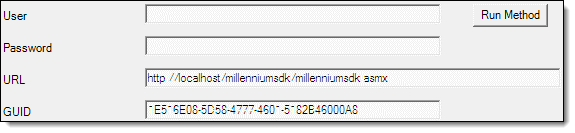
In the User (Login ID) and Password fields, type the login credentials for the Test Login account you created in Step 6 of the setup.
If you did not install the Millennium SDK on the computer where you have the Millennium database located, change "localhost" in the URL field to the name of the computer where you have the Millennium database located.
In the GUID field, type the registration number obtained in Step 5 of the setup.
Click Run Method.
A notification displays at the bottom of the screen to confirm that the login was successful.
Important: If you are unable to log in successfully, contact the Development Team for further assistance.
Click OK.
The setup is complete and the Millennium SDK is now ready to use.