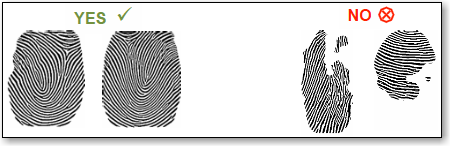
The accuracy of fingerprint recognition depends greatly on the quality of the initial fingerprints taken when enrolling a person for the first time and those taken for subsequent identification attempts. The initial fingerprints are stored permanently in Millennium, and used for comparison each time a person places their finger on the reader for identification. Therefore, if you register a poor quality fingerprint, Millennium may not recognize you when you scan their finger.
Capture a full and centered fingerprint. The finger recognition process works by locating identical minutiae points, which are unique for each individual. If the biometric reader does not locate a high enough volume of similar minutiae when comparing the scanned and database prints, an error message will display. For this reason, it is critical that you capture as full and centered a fingerprint image as possible when registering your fingerprint. The fingerprint should nearly fill the scan window and be roughly centered within it.
Capture the core of your fingerprint. The core of the fingerprint is the center. If you capture the core of your fingerprint during registration, the reader will extract unique minutiae points from this distinct area. Therefore, if you scan the core of your finger each time you, this greatly improves the accuracy of the identification process and limits the possibility of rejection. Therefore, you should capture the core of your fingerprint during every fingerprint scan.
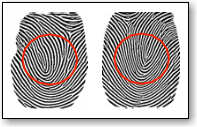
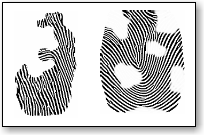
Press your finger flat against the scanning surface. The biometric reader captures a much better fingerprint when you press your finger flat against its surface. If you do not hold your finger flat against the fingerprint reader for at least one full second, the reader may capture an incomplete print or may not capture anything at all. Pressing your finger with some pressure against the scanning surface ensures that the maximum surface area of the print is in contact with the reader and that the print has no "gaps" or "holes".
Use your middle finger. Most people tend to associate fingerprint technology with the thumb or index finger, which are actually the two worst prints to use. These fingers are more widely used for day-to-day activities and therefore are more prone to damage. Therefore, you should register your middle finger (or the ring finger) because it typically produces (and retains) a much higher quality fingerprint.
Use a fingertip moistener. Using a specialized fingertip moistener can help to produce higher quality fingerprint scans from otherwise problematic skin surfaces (e.g. dry fingers). A fingertip moistener produces more ridge detail in the fingerprint for a more detailed image and leaves no residue on the fingertip.
Avoid capturing either side of your fingerprint or just the tip. Imagine during enrollment that you capture only the right side of a fingerprint. Then, during a subsequent identification attempt, you scan the left side of your fingerprint. The reader will not find enough similar minutiae to identify your finger. Your captured fingerprint image should not look like any of the following:
The following image illustrates the correct finger placement on the biometric reader.
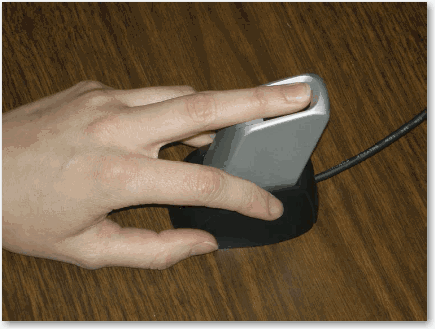
The person is using their middle finger.
The finger is flat against the reader surface.
The person placed the tip of their finger against the edge of the scan area.
The person is applying a firm amount of pressure on the scanning surface.
Using these guidelines, the registered fingerprint should display as follows:
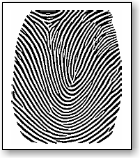
In the following illustration, the person is placing their finger at a 45° angle to the scanning surface and only capturing the tip of their finger. This limits the captured surface area and number of minutiae point, leading to difficulty with identification.
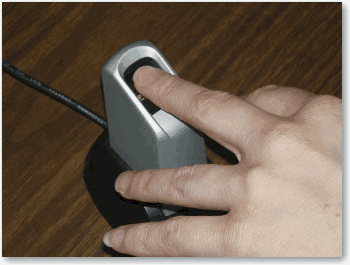
In the following illustration, the person is placing the side of their finger on the scanning surface. This limits the captured surface area and number of minutiae points, leading to difficulty with identification.
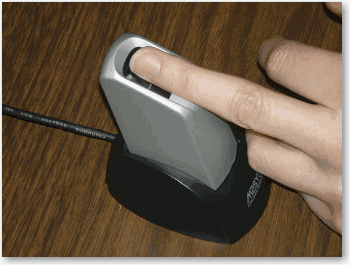
In the following illustration, the person is using their thumb. The thumb and index finger have been shown to be the most prone to damage and are therefore the worst fingers to use, so you should always use your middle finger for more accurate and consistent results.

As with any software system using a hardware device to interact with users, there are certain limitations. Recognizing these limitations and employing methods to help overcome them will greatly improve the performance of the system.
These limitations are in addition to the importance of image quality during enrollment and identification as explained earlier:
Damaged Fingers
Cuts, very rough, or very dry prints can sometimes have an effect on image quality.
For very dry prints (e.g. cold weather), rubbing the fingers together to create warmth and friction, using a fingertip moistener or lotion, or swiping the finger across the nose or forehead can improve quality.
If a particular finger just will not work during enrollment, simply use a finger that does work.
Elderly and Children
An evaluation of fingerprint quality across an elderly population by Purdue University revealed that certain attributes associated with elderly individuals correlate to lower fingerprint image quality: an increase in age and a decrease in fingerprint moisture content.
Using methods described above to increase moisture content can improve quality.
If you find that very small children are experiencing difficulty with the system, try utilizing their thumb to capture as large a surface area as possible.
Registering an Employee's Fingerprints
Registering a Client's Fingerprints