3. Enable the Galaxy LightSpeed Interface
The next step is to enable the Galaxy LightSpeed interface in Millennium.
-
Access Millennium with an administrator account.
-
Select File > Enable/Disable PMS.
The PMS Interface Selector window displays.
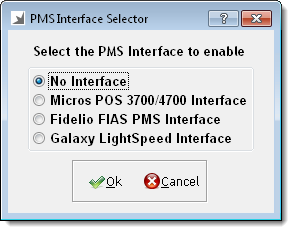
- Select Galaxy LightSpeed Interface.
- Click Ok.
- Restart Millennium.
- Click here to proceed with the next step of the setup.
related links
4. Configure Millennium