Access Millennium with an administrator account.
Click  on the toolbar.
The next step is to configure settings for the Fidelio interface in Millennium.
Access Millennium with an administrator account.
Click on the toolbar.
The Millennium Intelli-Text Control window displays.
Type "DU000" in the OR type a report number here field and click Ok.
The Reports & Graphs window displays.
Click Print and print the report on an available printer as normal.
Return to the Reports & Graphs window and complete the following:
Select "Services" in the Report Category field.
Select "DV000: Basic Service Class Information" in the Report List field.
The Business Information window displays.
The PMS Sales Outlet\Itemizer Definitions window displays.
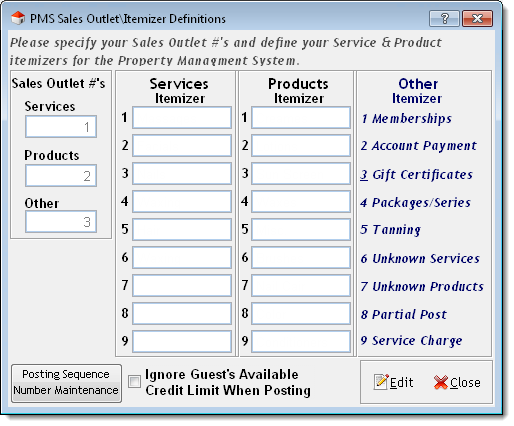
Using the DU000 and DV000 reports as a guide, type the sales itemizers to use for your product and service classes in the Services Itemizer and Products Itemizer fields.
Select Ignore Guest's Available Credit limit When Posting if you want to allow guests to exceed their credit limit when posting charges.
The Product Classes window displays.
Complete the following for every product class:
Click Edit.
Select a sales itemizer for the product class in the PMS Class field.
Click Save.
The Service Classes window displays.
Complete the following for every service class:
Click Edit.
Select a sales itemizer for the service class in the PMS Class field.
Click Save.
on the toolbar.The Millennium Intelli-Text Control window displays.
Type "PMS00M" in the OR type a report number here field and click Ok.
The Reports & Graphs window displays.
Click Print and print the report on an available printer as normal.
Using the PMS00 report as a guide, enter the sales outlets and sales itemizers into Fidelio.
More Info: Contact MICROS Systems for instructions on how to enter sales outlets and sales itemizers into Fidelio.
Click here to proceed with the next step of the setup.
6. Configure Security Settings