Click  on the toolbar.
You can run the MR055: Gift Certificates Purchase report to display the SpaBoom gift certificates sold during a specified date range. The following guide explains how to run this report.
Click on the toolbar.
The Millennium Intelli-Text Control window displays.
Type "MR055" in the OR type a report number here field and press Enter.
The Reports & Graphs window.
Select a date range for which to view data.
Click Preview.
The Gift Certificate Type Selection List window displays.
The Clients Selection window displays.
A print preview of the MR055 report displays.
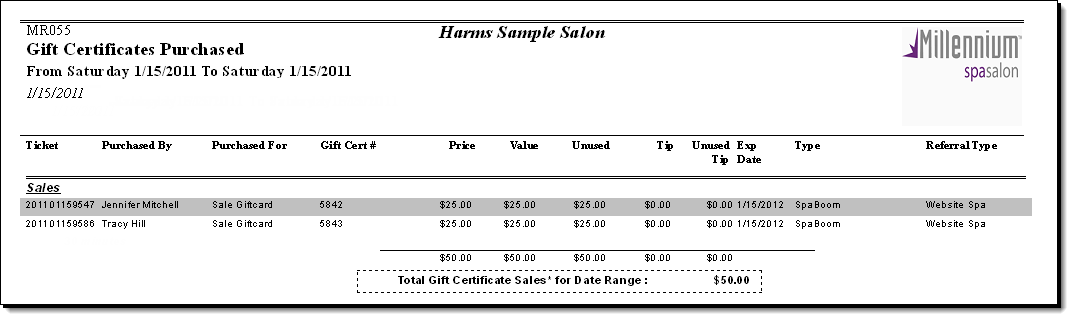
Following are descriptions of the fields on the MR055 report.
Ticket = Identifying number for the transaction where the gift certificate was sold.
Purchased By = Name of the client that purchased the gift certificate.
Purchased For = Name of the client for whom the gift certificate was purchased.
Gift Cert # = Identifying number assigned to the gift certificate.
Price = Amount paid for the gift certificate.
Value = Redemption value of the gift certificate.
Unused = Amount of credit that remains unused.
Exp Date = Expiration date for the gift certificate.
Tip = Prepaid tip sold with the gift certificate.
Unused Tip = Amount of prepaid tip that remains unused.
Type = Type of gift certificate sold.
Total Gift Certificate Sales for Date Range = Total amount of revenue generated by gift certificate sales during the report date range, calculated as follows:
Gift Certificate sales – Gift Certificate refunds
Important: This total refers to the money collected and not the value of the gift certificates sold.