The next step is to enter your SpaBoom account details on the SpaBoom GC Import Setup window in Millennium.
Access Millennium with an administrator account.
Select File > SpaBoom Setup.
The SpaBoom GC Import Setup window displays.
Click Edit.
Complete the following:
Type the ID for your SpaBoom account in the SpaBoom Id field.
Type "spaboom" in the Desired SDK LoginId field.
Type "spaboom12*" in the Desired SDK Password field.
Select "SpaBoom" in the Gift Type field.
Select "SPABOOM: SpaBoom, SpaBoom" in the Sold by Employee field.
Select "SPABOOM" in the Referred By field.
Select "SpaBoom" in the Drawer Id field.
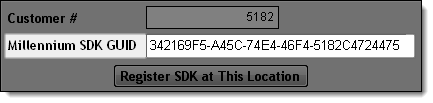
Click Register SDK at This Location.
Click OK.
Note the registration number that displays in the Millennium SDK GUID field.
Tip: You need this registration number to complete Step 8 of the setup.
Click Save.
Click OK.
Click here to proceed with the next step of the setup.
7. Configure Your SpaBoom Account