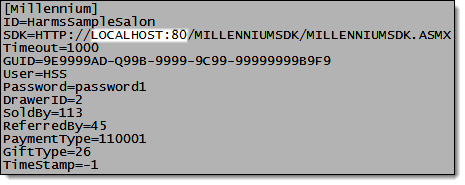
If you decide to change the port used for the web site where you have the Millennium SDK installed, you need to update the HarmsBridgeMillennium.ini file to reflect this change.
Open the Millennium folder on the computer where you have the Millennium database located.
Tip: The default location for the Millennium folder is C:\Harms\Millennium\.
Open the HarmsBridgeMillennium.ini file in Notepad.