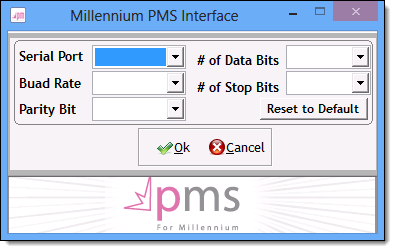
The next step is to configure the interface software.
Note: You need to know the correct communication settings to use for connections to Fidelio to complete this step. Contact MICROS Systems for more information on the correct settings to use.
Complete one of the following:
Double-click the Millennium PMS Fidelio Interface shortcut on the Windows desktop.
On the Start screen, type "desktop", press Enter, and double-click the Millennium PMS Fidelio Interface shortcut.
The Interface Not setup message displays.
The Millennium PMS Interface window displays.
The following fields display.
In the Serial Port field, select the serial port used for the connection to the Fidelio computer.
Enter communication settings in the remaining fields using the guidelines provided by MICROS Systems.
The interface software attempts to connect to the Fidelio computer. When the connection is successful, the Connection Status changes to "Connected".
Important: If you are unable to connect to the Fidelio computer successfully, contact Business Support for further assistance.
4. Enable the Fidelio Interface