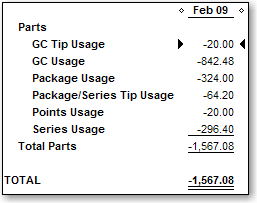
The Usage Summary report displays details of liability usage during the report date range.
Tip: Run the Usage Summary report to verify that liability usage data uploaded to QuickBooks successfully. If you run the MR080: Register Summary report in Millennium, the liability usage totals that display on the left side of that report should match the totals that display on the Usage Summary report if you select the same date range for both reports.
Open your company file in QuickBooks.
Open AccountSync.
Select the location for which to run the report.

Select Reports > Usage Summary.
The Custom Summary Report window opens in QuickBooks with the Usage Summary report displayed. The report shows details for the last date range of transactions uploaded to QuickBooks.
Complete the following as necessary:
View the data for a different data range = Select a new date range and click Refresh.
View detailed information for the transactions where liabilities were used = Double-click the dollar amount next to a liability type.